
A wall-mounted television can reclaim furniture space and tidy up a bedroom, living room, or home gym, but the wall type matters nearly as much as the bracket itself. You need to match the mount to your screen size, weight, mounting pattern, and the amount of movement you want. A fixed model gives you the cleanest appearance, while tilting and full-motion options add flexibility for glare, cable access, and viewing angles.
A Closer Look At The Lineup

Auoace No Stud TV Wall Mount

GLWIXY Tilt TV Mount 32–68
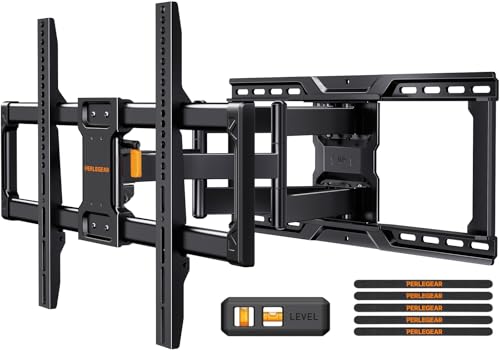
Perlegear Full Motion TV Mount

MOUNTUP Fixed TV Mount 1.3-Inch 50–100 Inch

Perlegear Full Motion Mount 42–90

monTEK 1.1-Inch Slim TV Mount
A Breakdown Of The Leading Choices
A wall-hung screen usually looks neatest when the bracket nearly disappears behind it. The Auoace No Stud TV Wall Mount takes a practical approach for renters and homeowners who cannot locate wall studs, using a hammer-in installation rather than power tools or screws. For most people in a rental or an older plaster-walled home, that installation difference may matter more than having the screen move.
The low-profile design supports screens from 32 to 75 inches and accommodates VESA patterns from 200 by 100 millimeters to 600 by 400 millimeters. VESA refers to the standardized distance between a television’s mounting holes. Thickened cold-rolled steel provides a stated load capacity of 150 pounds, giving it more support than the frame alone might suggest.
Noteworthy Benefits
- Stud-free installation suits drywall and plasterboard walls.
- Hammer-and-hardware setup reduces the need for drilling and power tools.
- The 32-to-75-inch range covers many living rooms and home gyms.
- A 150-pound capacity supports a broad range of television sizes.
Practical Considerations
- Confirm your screen weight and VESA measurements before installation.
- The fixed design offers no tilt or repositioning after mounting.
Quick Facts
The Right Fit
This mount fits renters, first-time installers, and anyone whose wall lacks accessible studs but otherwise meets the size, weight, and VESA requirements.
A Better Fit Elsewhere
MOUNTUP Fixed TV Mount 1.3-Inch 50–100 Inch serves larger screens and heavier panels on walls with suitable studs.
Unlike the Auoace No Stud TV Wall Mount, the GLWIXY Tilt TV Mount 32–68 assumes you have a suitable stud, brick, or concrete wall. That requirement makes it a more conventional choice for a bedroom or living room where a screen hangs above furniture and needs a little downward angle. The bracket stays about 1.9 inches from the wall while allowing movement of up to 15 degrees.
Its cold-rolled steel frame supports up to 132 pounds and fits a broad selection of flat or curved screens from 32 to 68 inches. Compatibility is determined by the VESA pattern, which measures the horizontal and vertical spacing of the four mounting holes. The included hardware covers TV attachment as well as brick and concrete wall installation.
Real-World Strengths
- The tilt range helps direct the screen downward toward seated viewers.
- A shallow 1.9-inch wall gap works well above narrow furniture arrangements.
- Included wall anchors support brick and concrete installations.
- The 132-pound rating suits many mid-sized and large televisions.
Things To Weigh
- Drywall alone is not a suitable installation surface.
- Check rear inputs and the 1.9-inch clearance before mounting.
Feature Snapshot
Who Will Love This
You’ll appreciate this bracket in a room with a structural wall, a screen mounted above seating, and a need for downward tilt without full repositioning.
Another Choice May Suit
Perlegear Full Motion TV Mount is the better fit when your television needs to extend, swivel, and tilt rather than only adjust up or down.
The Perlegear Full Motion TV Mount moves beyond the simple angle adjustment offered by the GLWIXY Tilt TV Mount 32–68. Full motion means the screen can be repositioned rather than remaining in one fixed plane, which helps when your seating, reflections, or cable access change. That flexibility makes sense in a multipurpose living room or an office where one screen serves several positions.
Its range is unusually broad for a full-motion bracket: most flat or curved screens from 45 to 95 inches fit, with a stated capacity of 150 pounds. VESA patterns run from 200 by 100 to 600 by 400 millimeters. Installation is designed for wood studs in several common spacings, along with brick and concrete, but not drywall by itself.
Features That Help
- Full movement adds flexibility in rooms with changing sightlines.
- The 45-to-95-inch range accommodates very large displays.
- A 150-pound limit covers many large television loads.
- Steel construction suits a robust wall-mounted arrangement.
- Multiple stud spacings offer practical placement flexibility.
Points To Keep In Mind
- Full-motion hardware occupies more depth than a fixed model.
- Drywall alone cannot support the installation.
Built With In Mind
This bracket is a strong match for large-screen homes with wood-stud, brick, or concrete walls where frequent repositioning is worthwhile.
Swap It Out When
MOUNTUP Fixed TV Mount 1.3-Inch 50–100 Inch is a cleaner choice when a stationary screen, minimal depth, and a 199-pound capacity matter most.
Fixed hardware wins when your priority is a clean wall and a screen that stays in one carefully chosen position. The MOUNTUP Fixed TV Mount 1.3-Inch 50–100 Inch holds the television only 1.3 inches from the surface, which is less depth than the GLWIXY bracket’s 1.9-inch profile. For a large display above a credenza or console, that narrow gap can create a more finished look.
Its steel construction supports up to 199 pounds, making it the highest stated load capacity in this group. The bracket accepts screens from 50 to 100 inches and VESA patterns up to 800 by 600 millimeters. Stud spacing from 16 to 32 inches gives you useful placement options on common wood-framed walls.
Points In Its Favor
- The 1.3-inch profile keeps large displays close to the wall.
- A 199-pound capacity serves heavier television models.
- The 50-to-100-inch range covers very large screens.
- A level design helps the television sit straight.
- Wide stud-spacing support adds placement flexibility.
Trade Offs
- The fixed design offers no tilt or movement.
- Wood studs, brick, or concrete are needed for suitable support.
Core Details
Best Suited To
You’ll appreciate this fixed mount in a finished living room with a very large screen and a wood-framed wall offering suitable stud spacing.
Where A Sibling Pick Shines
Perlegear Full Motion TV Mount offers more positioning freedom for rooms where glare, seating, or rear cable access changes often.
The second Perlegear option serves a slightly different screen range than the 45-to-95-inch model. This version accommodates most flat or curved televisions from 42 to 90 inches, giving 42- and 43-inch screens a place in the lineup. For a large television in a conventional living room, the combination of broad size coverage and movable positioning feels balanced.
The stated load rating is 132 pounds, and supported VESA patterns extend from 200 by 100 to 600 by 400 millimeters. Installation fits 8-, 12-, and 16-inch wood-stud spacing as well as brick and concrete walls. Drywall alone is not an acceptable mounting surface, so locating the framing before purchase saves avoidable work later.
Advantages To Know
- Supports flat and curved displays from 42 to 90 inches.
- Full movement helps adapt to glare and seating positions.
- Three common wood-stud spacings provide useful placement options.
- Concrete and brick walls are suitable installation surfaces.
Some Limits To Know
- The 132-pound rating is lower than the MOUNTUP option’s stated capacity.
- Wider stud spacing may require a separate extension bracket.
Who Should Grab It
This mount suits households with a 42-to-90-inch television who want flexible positioning and have a properly framed wood, brick, or concrete wall.
Reach For A Different Pick When
monTEK 1.1-Inch Slim TV Mount better serves a tight room where a narrower wall gap matters more than the broader stud-spacing range.
The monTEK 1.1-Inch Slim TV Mount takes depth seriously, sitting slightly closer to the wall than the MOUNTUP fixed model’s 1.3-inch profile. Full-motion positioning still gives you room to change the viewing angle, so you are not forced to choose between a narrow gap and flexible placement. It appears especially useful in compact living rooms and narrow entertainment centers.
Most 43-to-90-inch LCD, LED, and OLED televisions fit within the stated range, with support up to 132 pounds. VESA compatibility starts at 100 by 200 millimeters and reaches 600 by 400 millimeters. Installation is designed for 16- or 18-inch wood studs, plus brick and concrete, but drywall alone will not provide the necessary structural backing.
Useful Highlights
- The 1.1-inch profile is the shallowest stated clearance here.
- Full motion preserves viewing flexibility in tight rooms.
- Most LCD, LED, and OLED screens from 43 to 90 inches fit.
- The broad VESA range accommodates many mounting patterns.
Details To Watch
- Drywall alone is not a suitable mounting surface.
- Check the television’s rear connections because a full-motion bracket uses more depth when repositioned.
Technical Reference
Made For Compact Rooms
This bracket fits your setup when a large screen, movable viewing angle, and minimal wall clearance are all important in a compact space.
Look Elsewhere When
MOUNTUP Fixed TV Mount 1.3-Inch 50–100 Inch is the better choice for heavier screens and a fixed, level display on a suitable stud wall.
What Matters Before Your TV Meets the Wall
Start With the Screen’s Mounting Pattern
VESA compatibility means the dimensions between the four holes on your television’s rear panel. Measure both the width and height, then compare them with the bracket’s supported range. A screen can fall within the stated size range and still fail to fit because its mounting pattern differs.
Check Weight and Wall Construction
Your television’s weight must remain below the bracket’s stated load capacity, with the wall also providing proper support. Wood studs, brick, and concrete offer different installation requirements, while drywall alone generally requires a stud-free system specifically designed for that construction. Measure stud spacing and note any pipes or wiring before drilling.
Decide How Much Movement You Need
A fixed bracket provides the narrowest profile and a predictable final position. A tilting model adjusts up or down, which is helpful above a sofa or entertainment console. A full-motion bracket changes the screen’s position more extensively, making it useful in rooms where glare, seating, or rear connections create competing constraints.
A Few Details That Prevent Regret
Mistakes Worth Dodging
The most consequential mistake is buying from screen size alone, since VESA spacing and weight can rule out an otherwise suitable size. Another common error is assuming ordinary drywall can carry any bracket. Measure the holes, check the manual, and identify the wall construction before the television arrives.
What Separates Premium From Basic
Higher-capacity models usually provide stronger steel, broader VESA coverage, larger size ranges, or more substantial movement hardware. Those additions matter with a 75-inch screen, a heavier panel, or a demanding viewing arrangement. For a smaller television in a simple room, a basic fixed or tilting model may cover the same practical needs.
Frequently Asked Questions
How Do I Find the Correct VESA Pattern for My TV?
Check the manual or the label behind the television for its mounting dimensions. Compare the horizontal and vertical hole spacing with the bracket’s supported VESA range.
Can a Low Profile TV Mount Be Installed on Drywall?
Only a bracket specifically designed for drywall should be installed without wall studs. Other models generally require wood studs, brick, or concrete for structural support.
How Much Weight Should a TV Mount Support?
Choose a bracket rated above your television’s actual weight. Also check the wall construction and the screen’s VESA pattern before installation.
Is a Fixed Mount Better Than a Full-Motion Model?
A fixed mount creates the cleanest appearance and uses the least depth. A full-motion model offers more viewing positions when glare, seating, or cable access require adjustment.
What Should I Measure Before Ordering a Mount?
Measure the television weight, VESA pattern, screen size, stud spacing, and available wall depth. Rear connections also matter, especially with tilting and full-motion brackets.
Closing Thoughts
The Auoace No Stud TV Wall Mount stands apart for drywall and plasterboard installations, while the GLWIXY model adds useful tilt on structural walls. For large, heavy screens, MOUNTUP provides the highest stated capacity, and Perlegear covers flexible positioning. The monTEK model makes the most sense when minimizing wall clearance is your priority. Match the bracket’s movement, load rating, VESA range, and installation surface to your room before ordering.