
Your TV needs to move beyond the wall for a better view from the couch, kitchen island, or desk. A long-arm wall mount adds that flexibility, but the useful choice depends on screen size, available arm reach, wall structure, and the room layout. These six options cover everything from compact setups to large displays and corner viewing.
The Picks In Brief

WHYFONE 48-Inch Rotating TV Mount

HCMOUNTING 132-lb TV Mount

Mount-It! 24-Inch Full Motion TV Wall Mount for 32-55 Inch Flat or Curved TVs
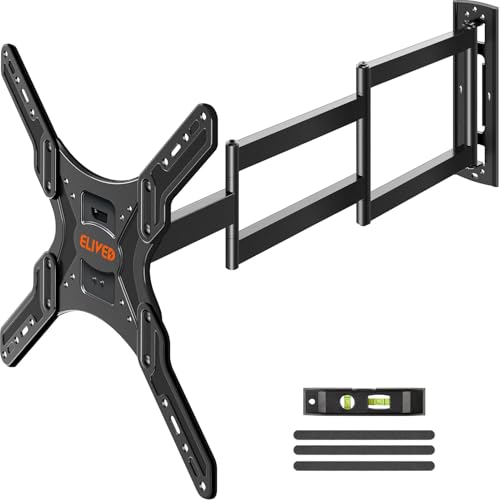
ELIVED 37.4-Inch TV Wall Mount

XINLEI MA1079L 40-Inch Full Motion TV Mount for 32-84 Inch TVs, 132 lbs, 600×400

XINLEI 40-Inch TV Wall Mount
What Each Pick Brings To The Table
A screen mounted beside a treadmill or in a narrow room can be more useful when it changes orientation. The WHYFONE model combines a 48-inch extension with 90-degree rotation in either direction, moving from standard landscape viewing to a vertical portrait position.
That movement matters most for exercise videos, phone-based content, and setups where the television occupies a side wall. Compared with the Mount-It! model, its defining advantage is rotation rather than a larger range of tilt and swivel adjustments.
The Practical Payoff
- Rotates between landscape and portrait positions for vertical content.
- The 48-inch extension provides ample reach from a side wall.
- Supports televisions from 26 to 65 inches.
Practical Considerations
- Allow enough clearance for the rotating display and its movement.
- Confirm your television’s dimensions, weight, and mounting pattern before installation.
Quick Facts
Who It Suits Best
You benefit most from this mount when following vertical exercise content or placing a television where portrait orientation adds practical value.
Where Another Pick Suits Better
The Mount-It! 24-Inch Full Motion TV Wall Mount suits smaller screens that need detailed tilt, swivel, and leveling control.
A large television and a soundbar can push a wall mount beyond its comfortable scope, so load capacity deserves attention before screen size. The HCMOUNTING model supports up to 132 pounds and accommodates displays from 26 to 70 inches.
Its dual-arm steel construction and corner-oriented design suit a large screen in an open room or beside furniture. The single-stud swivel arrangement is convenient for a corner installation, though the wall’s stud location still determines where the mount can sit.
Reasons It Performs
- Carries up to 132 pounds for heavier television setups.
- Supports screen sizes up to 70 inches.
- Dual-arm steel construction suits demanding loads.
- Corner placement brings the display into off-axis viewing positions.
- A single-stud design simplifies the wall-centering decision.
Trade Offs
- Single-stud mounting depends on accurate stud location and sound wall structure.
Technical Highlights
Built With In Mind
You get the most from this mount with a 65- or 70-inch television, a soundbar, and a wall location that offers a suitable stud.
Consider Something Else When
The XINLEI MA1079L 40-Inch Full Motion TV Mount serves larger displays up to 84 inches with a wider VESA range.
Fine adjustment can make the difference between a screen you look at and one you want to keep looking at. The Mount-It! extends 24 inches, retracts to 2.75 inches, and supports tilt, swivel, and slight rotation for precise positioning.
For a bedroom, office, apartment, or compact media area, the 32- to 55-inch range offers a sensible balance between reach and display size. You also gain broad VESA compatibility, which refers to the distance between a television’s mounting holes.
What Makes Sense
- The 24-inch extension reaches around furniture and into corner positions.
- Retraction to 2.75 inches reduces the gap behind the screen.
- Tilt ranges from 10 degrees upward to 15 degrees downward for glare control.
- Swivel reaches 90 degrees, subject to screen size.
- Supports flat and curved displays up to 77 pounds.
Small Caveats
- The 24-inch reach is shorter than the ELIVED and XINLEI options in this group.
- The 77-pound limit is lower than the 132-pound capacities offered by two heavier-duty picks.
Right Fit For
You benefit most from this mount with a 32- to 55-inch television in a bedroom, home office, apartment, or RV.
Not Your Match When
The HCMOUNTING 132-lb TV Mount fits better for a heavier 65- or 70-inch display with additional equipment.
Reaching a television around a corner or pulling it toward a seating area calls for more extension than a basic fixed bracket provides. The ELIVED mount extends 37.4 inches from the wall and retracts to 3 inches when you want a cleaner profile.
Its 26- to 65-inch compatibility covers many common living-room displays, while support for mounting patterns up to 400 by 400 millimeters broadens the hardware options. That makes it a practical middle ground between the 24-inch Mount-It! and the longer XINLEI models.
Strong Points
- Long reach supports corner placement and flexible viewing positions.
- A 3-inch retracted profile keeps the display reasonably close to the wall.
Points To Note
- Its 37.4-inch reach falls between the shorter Mount-It! and the 40-inch XINLEI models.
- The 65-inch upper limit excludes some larger displays.
- Check the television’s mounting pattern against the supported maximum before ordering.
Feature Snapshot
Who Will Love This
You benefit most from this mount in a living room where a 26- to 65-inch television needs substantial but retractable reach.
A Better Fit Elsewhere
The XINLEI MA1079L 40-Inch Full Motion TV Mount gives you more reach and supports displays as large as 84 inches.
A large screen needs more than room for the image itself. You also need clearance for the mount to pull out, swivel, tilt, and return to the wall. The XINLEI MA1079L uses a three-section arm that reaches nearly 40 inches and retracts to 2.99 inches.
Its compatibility with displays from 32 to 84 inches makes it unusually broad, and the 132-pound limit leaves room for a television with a soundbar. The wall must still accommodate the stated 16-inch wood-stud requirement, so structural planning comes before screen selection.
The Case For It
- Three linked arm sections provide a 40-inch extension.
- The television can retract to 2.99 inches from the wall.
- Supports 32- to 84-inch displays with a 132-pound capacity.
- A 600x400mm maximum VESA pattern accommodates a wide range of displays.
Factors To Consider
- The full extension needs substantial open space and careful positioning.
- Large screens remain heavy, so confirm the total load and wall support.
The Numbers That Matter
The Right Fit
You benefit most from this mount with a large television, a soundbar, and a room that offers generous clearance.
Where A Sibling Pick Shines
The HCMOUNTING 132-lb TV Mount is more compact in its stated screen range for setups that do not need an 84-inch display.
Long reach does not require an oversized television, and the XINLEI 40-inch model keeps the focus on a straightforward full-motion setup. Its three-section arm extends to 39.37 inches before retracting to 2.99 inches.
Displays from 26 to 65 inches fit the stated range, and the supported VESA layouts extend from 100 by 100 millimeters to 400 by 400 millimeters. For many living rooms, that gives you enough movement for a side-wall or corner position without moving into the larger MA1079L model.
The Value In It
- Nearly 40 inches of reach supports flexible side-wall and corner placement.
- The broad 26- to 65-inch range covers many mainstream televisions.
Some Limits To Know
- Its stated load and size range are narrower than the XINLEI MA1079L.
- Single-stud installation requires an accurately located wall stud.
- Extended positioning needs clear space around the furniture and display.
Made For
You benefit most from this mount with a standard 26- to 65-inch television in an open-plan room or corner installation.
Swap It Out When
The WHYFONE 48-Inch Rotating TV Mount is a stronger match for vertical content and exercise-focused viewing.
Match The Mount To Your Room Geometry
Reach matters more than a round number. Measure from the wall to the intended viewing position, then account for the depth of your television and nearby furniture. A 24-inch arm can work in a compact room, while 40- and 48-inch models need deliberate clearance.
A long arm also changes how the screen sits in the room. Pulling it toward a sofa can improve eye-level viewing, but extending it around a corner may place cables under tension. Choose a layout that lets the display return close to the wall without blocking a walkway.
Check The Television’s Actual Fit
Screen size is only the starting point. Check the television’s weight, overall dimensions, and VESA mounting pattern, meaning the horizontal and vertical spacing between its mounting holes. The Mount-It! supports up to 77 pounds, while the HCMOUNTING and XINLEI MA1079L reach 132 pounds.
Measure the television’s depth as well as its width. A slim panel needs less room behind it, and curved screens require careful attention to corner clearance as the mount extends and rotates.
Understand The Motion You Need
Full-motion mounts combine swivel, tilt, and extension through linked arms. Swivel moves the screen side to side, tilt changes its vertical angle, and extension pulls it away from the wall. The Mount-It! provides the most explicitly described adjustment ranges, while the WHYFONE prioritizes portrait rotation.
Think about how the room is actually used. A kitchen viewer may need frequent swivel, a bedroom may value compact retraction, and a workout area may benefit from a vertical screen. Match the mechanism to the movement your routine requires.
Account For The Wall And Cables
Stud placement determines the real installation options. The HCMOUNTING and XINLEI 40-inch models use a single-stud arrangement, while the MA1079L lists a 16-inch wood-stud requirement. Locate the framing before choosing the wall position or ordering additional hardware.
Plan the cable route too. Leave enough slack for the arm to extend, swivel, and return without pulling hard against the television connection. A neat wall appearance is less useful than a mount that moves freely without straining its cables.
Common Mistakes Worth Dodging
Choosing by arm length alone can leave you with an unsuitable screen size or mounting pattern. Measure the television, wall location, viewing position, and furniture before selecting a model. Reach, load capacity, and wall structure need to work together.
What Separates Premium From Basic
A higher-tier model may add reach, motion control, or a stronger load capacity. Those improvements matter most with large displays, soundbars, irregular walls, and frequent repositioning, while a smaller screen in a simple room may need fewer features.
Frequently Asked Questions for Long Tv Wall Mount
How far can a long TV wall mount extend?
Published reach in this group ranges from 24 inches on the Mount-It! model to 48 inches on the WHYFONE mount. The ELIVED extends 37.4 inches, while both XINLEI options reach roughly 40 inches.
How much weight can these TV mounts support?
Load capacity ranges from 77 pounds on the Mount-It! option to 132 pounds on the HCMOUNTING and XINLEI MA1079L. Include the television, soundbar, and any other attached equipment in your weight check.
Do all of these mounts support a 65-inch television?
Every option in the group supports televisions up to at least 65 inches. The HCMOUNTING reaches 70 inches, and the XINLEI MA1079L extends to 84 inches.
What does VESA compatibility mean?
VESA compatibility refers to the distance between the four mounting holes on the back of a television. Match those dimensions and the television’s weight against the mount’s supported range before installation.
Can a long-arm mount be installed on a corner wall?
Corner placement works when the arm can extend around the wall without striking nearby objects. The HCMOUNTING, ELIVED, and XINLEI options support this type of flexible positioning, subject to their stated mounting requirements.
Closing Remarks
The most useful long TV wall mount is the one that fits your television, wall, and viewing habits without demanding unnecessary space. Short reach works well in compact rooms, while longer articulated arms suit corners, large displays, and frequently changing viewing positions. Measure first, then choose the smallest movement system that solves your layout.