A dusty laptop in the back of a pickup has to handle estimates, email, photos, spreadsheets, and a client call without slowing down your workday. These options give contractors practical combinations of screen space, memory, storage, portability, and touch support, so you can choose based on the work you actually do rather than processor jargon.
Your Options, Compared
HP OmniBook 5 16-inch 2K Next Gen AI PC, 16GB RAM, 512GB SSD, Glacier Silver
Lenovo 15.6-inch FHD Business Laptop

Microsoft Surface Pro 13-inch 2-in-1 Laptop, Snapdragon X2 Plus, 16GB RAM, 256GB SSD

HP 17.3-inch FHD Business Laptop, Ryzen 5 7430U, 16GB RAM, 512GB PCIe
HP OmniBook 3 16-inch 2K Touchscreen Laptop, 8GB RAM, 512GB SSD
HP 17.3-inch FHD Business Laptop, Ryzen 5 7430U, 8GB RAM, 512GB PCIe
Why These Options Stand Out
Your desk, vehicle, and meeting table rarely offer the same amount of room, which makes the 16-inch 2K display useful for reviewing line items, building schedules, and presenting photos. The combination of 16GB of working memory and 512GB of storage gives you more room for multiple open documents than the smaller Lenovo Business 15.6-inch FHD Laptop.
For a contractor moving between appointments, the claimed battery life of up to 34 hours and compact 65-watt USB-C charger are meaningful conveniences. The fit depends on your trade software and connected equipment, so confirm those support the Snapdragon platform before committing.
What Works In Its Favor
- 16GB of RAM gives you comfortable headroom for email, spreadsheets, browser tabs, and photo management.
- The 2K display provides a generous field for estimates, drawings, and client conversations.
- A 512GB solid-state drive, or SSD, stores project documents without the bulk of a spinning drive.
- The listed battery claim of up to 34 hours reduces the need to recharge between nearby jobs.
- The 65-watt GaN charger is smaller than a conventional power brick and supports fast charging.
Practical Considerations
- Confirm compatibility with your estimating, accounting, CAD, and field-management applications.
- A 16-inch screen gives you more workspace than the 13-inch Microsoft Surface Pro, with less emphasis on compact carrying.
Key Specs
Built With In Mind
You benefit most from this model when you regularly handle large spreadsheets, detailed plans, and client documents on a Windows laptop you need to carry between appointments.
Another Choice May Suit
The Microsoft Surface Pro 13-inch 2-in-1 Laptop, Snapdragon X2 Plus, 16GB RAM, 256GB SSD suits contractors who value touch input and compact portability over a larger 16-inch display.
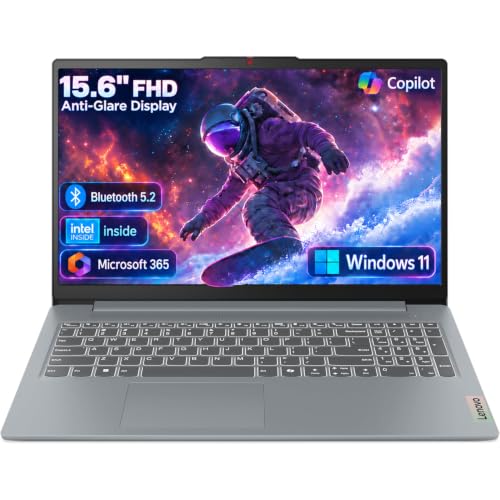
A simple invoice, a written estimate, and a morning email don’t demand a large screen or abundant storage. This Lenovo takes a more restrained approach, pairing a 15.6-inch full-high-definition panel with an Intel N150 processor, 8GB of LPDDR5 memory, and 128GB of fast onboard storage for routine office tasks.
For a contractor handling mainly documents, browsing, communication, and video calls, that configuration may be enough. You will notice the difference quickly once large photo libraries, several browser-based tools, and complex spreadsheets begin competing for the same 8GB of working memory.
Positive Points
- The Intel N150 has four cores and can reach 3.6GHz for responsive everyday productivity tasks.
- LPDDR5-4800 memory helps keep browser pages, documents, and calls running together.
- The 15.6-inch full-high-definition screen remains practical for office work and portable at the same time.
- Integrated Intel graphics support everyday entertainment and visual productivity.
Small Limitations
- Storage of 128GB leaves limited room for project photos, videos, and archived documents.
- 8GB of memory is a modest allocation for heavy multitasking or demanding estimating software.
- The 15.6-inch display offers less working space than either 17.3-inch HP business laptop on this list.
The Right Fit
This model makes the most sense for a solo contractor whose daily work centers on email, invoices, browsing, documents, and occasional video meetings.
Look Elsewhere When
The HP 17.3-inch FHD Business Laptop, Ryzen 5 7430U, 16GB RAM, 512GB PCIe suits you better when a large screen and more storage materially improve your workflow.
Touch input changes how you review a mark-up, sketch a rough layout, or show a client options without hunting for a small cursor. The Microsoft Surface Pro combines that flexibility with a 13-inch display, Snapdragon X2 Plus processor, 16GB of RAM, and a 256GB SSD in a more compact 2-in-1 format than the traditional HP models here.
You get enough working memory for browser-based office tools, communication, and document work, although 256GB stores less than the 512GB configurations offered by the Lenovo and HP choices. For mobile appointments, the smaller display may be more convenient than the HP OmniBook 5’s 16-inch panel, depending on how much plan detail you review away from your desk.
The Case For It
- The touchscreen supports direct interaction with drawings, forms, photos, and presentations.
- A 13-inch 2-in-1 design favors portability without moving to a tiny traditional laptop.
- 16GB of RAM supports multitasking across documents, communication, and web-based tools.
- The Snapdragon X2 Plus platform is aimed at efficient productivity and AI-assisted workflows.
Compatibility Checks
- Check trade software, accessories, and drivers for compatibility with the Snapdragon-based platform.
- The 256GB SSD has less capacity than the 512GB storage included with the HP OmniBook 5 and both 17.3-inch HP models.
Feature Snapshot
Who Will Love This
This laptop suits mobile contractors who frequently work from client sites, touch mark-ups, and switch between presentations and standard desktop tasks.
Reach For A Different Pick When
The HP OmniBook 5 16-inch 2K Next Gen AI PC, 16GB RAM, 512GB SSD, Glacier Silver serves you better when screen area and storage capacity outweigh compact touch-focused use.
Spreadsheets become harder to work with when you must keep scrolling between narrow panels, so the 17.3-inch full-high-definition display gives you a practical desktop-like workspace. This HP pairs that screen with an AMD Ryzen 5 7430U processor, 16GB of RAM, and 512GB of PCIe storage, a more generous configuration than the Lenovo Business 15.6-inch FHD Laptop.
The large display makes sense for estimating, scheduling, and comparing project documents in your office or vehicle. Its quiet-design emphasis also fits shared work environments, although integrated Radeon graphics remain better suited to general productivity than demanding specialized graphics work.
The Upside
- The 17.3-inch display provides the largest workspace among the traditional laptops listed.
- 16GB of RAM gives you more room for spreadsheets, browser tabs, and estimating software.
- A 512GB PCIe SSD provides ample active storage for documents and media.
- The Ryzen 5 7430U processor and integrated Radeon graphics cover mainstream productivity tasks.
- Built-in Wi-Fi and Bluetooth simplify connections to field headphones, speakers, and accessories.
Things To Consider
- The 17.3-inch footprint takes more room than the 13-inch Surface Pro or 15.6-inch Lenovo.
- Integrated graphics call for a compatibility check before specialized design or visualization work.
- The general-purpose hardware may not match a dedicated workstation for unusually intensive processing.
Quick Facts
Made For
You benefit most from this HP when most estimates, schedules, and project records are handled from a desk, office, or parked work vehicle.
Where A Sibling Pick Shines
The HP OmniBook 3 16-inch 2K Touchscreen Laptop, 8GB RAM, 512GB SSD suits you better when touch interaction and a sharper-class 2K panel matter more than maximum screen size.
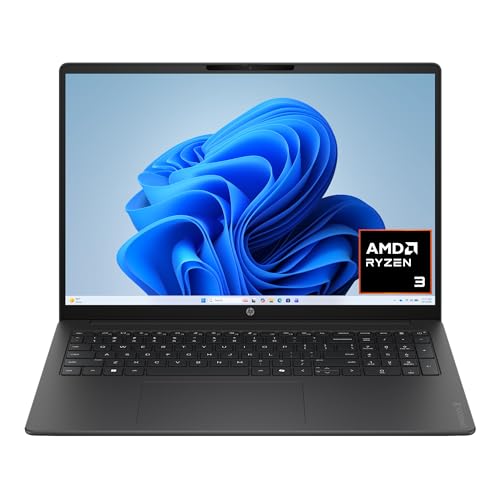
Reviewing a client-approved layout on a touchscreen can be faster than hunting through menus or working with a tiny target. This HP OmniBook 3 combines a 16-inch 2K touchscreen with an AMD Ryzen 3 30 processor, Radeon 610M integrated graphics, 8GB of RAM, and a 512GB SSD, giving you a tactile alternative to the HP 17.3-inch FHD Business Laptop.
That touchscreen becomes useful for mark-ups, browsing project photos, and showing progress during a meeting. You may find the 8GB memory limit more noticeable during heavy multitasking, especially when compared with the 16GB available in the HP OmniBook 5 and the 17.3-inch HP business laptop.
What Stands Out
- The 2K touchscreen combines a large work area with direct touch interaction.
- 512GB of storage holds a larger collection of photos, documents, and project media.
- Radeon 610M integrated graphics support everyday visual work without a separate graphics card.
- The 16-inch, 16:10 display provides a broad canvas for estimates and client presentations.
Trade Offs
- 8GB of RAM can constrain multitasking when several browser and office applications remain open.
- A touchscreen is most helpful for direct interaction, while long document writing still favors a physical keyboard.
Best Suited To
You benefit most from this configuration when you regularly review visual plans, touch mark-ups, and present work from a 16-inch display.
A Better Fit Elsewhere
The Microsoft Surface Pro 13-inch 2-in-1 Laptop, Snapdragon X2 Plus, 16GB RAM, 256GB SSD serves mobile contractors better when compact handling and 16GB of working memory take priority over storage capacity.
The 17.3-inch display and 512GB PCIe SSD make this a practical office-oriented configuration for estimates, schedules, and client records. It shares the Ryzen 5 7430U processor, integrated Radeon graphics, Windows 11, Wi-Fi, and Bluetooth with the 16GB version of the HP 17.3-inch FHD Business Laptop.
The key difference is memory. Its 8GB allocation is sufficient for focused document work, but you may find the 16GB model better suited to heavy multitasking, and the smaller 15.6-inch Lenovo may be easier to carry between appointments.
Well-Handled Touches
- The 17.3-inch full-high-definition display gives you room to work with detailed documents.
- 512GB of PCIe SSD storage supports a practical collection of active project files.
- The Ryzen 5 7430U processor and integrated Radeon graphics cover general productivity tasks.
Details To Watch
- 8GB of RAM is the main limitation when many demanding applications remain open simultaneously.
The Details
Whose Shelf It Belongs On
This model fits a contractor whose work stays mainly within documents, email, web-based tools, and storage rather than memory-heavy applications.
Swap It Out When
The HP 17.3-inch FHD Business Laptop, Ryzen 5 7430U, 16GB RAM, 512GB PCIe is the better choice for you when constant multitasking justifies more memory.
What Matters Before You Put a Laptop to Work
Start With the Workload
Your software tells you more than the badge on the box. Count the browser-based tools, estimating applications, spreadsheets, and video-call windows you normally keep open, then check whether your trade programs support the laptop’s processor platform. Peripheral compatibility matters too, especially for specialized measuring equipment, docking stations, and printers.
Match Memory and Storage
RAM acts as working memory, so 8GB suits focused office work while 16GB gives you more room for several active applications. Storage serves a different purpose: a 512GB SSD, or solid-state drive, can hold project documents and photos without the moving parts found in a traditional hard drive. Your local file library should guide the capacity you need.
Choose the Screen and Form
A 17.3-inch screen helps with detailed estimates and side-by-side documents, while a 13-inch model is easier to carry between appointments. A touchscreen becomes useful for mark-ups, photos, and presentations. Make sure the form factor also fits your keyboard habits, since touch access works better as a supplement than a replacement for precise typing.
Plan for the Workday
Battery claims vary by configuration and use, so treat them as a guide rather than a promise. Keep the charger in your vehicle for heavy field days, and review the listed support and accidental-damage coverage terms before purchase. That preparation is simple, but it can prevent an avoidable ownership headache later.
Two Details That Shape Your Decision
Mistakes Worth Dodging
Avoid choosing only by processor speed or screen size. A fast chip cannot compensate for insufficient memory, weak tool compatibility, or a display too small for your regular documents. Check your applications and storage needs before settling on a configuration.
Why Top Tier Costs More
Additional money often buys more memory, storage, display area, or platform capability. That upgrade matters when you multitask heavily or need specialized software, but a basic configuration remains sensible for email, estimates, and standard office tasks. Pay for the capacity you can actually use.
Frequently Asked Questions
Which laptop suits contractors who work away from a desk?
The Microsoft Surface Pro 13-inch 2-in-1 Laptop, Snapdragon X2 Plus, 16GB RAM, 256GB SSD offers the most compact touch-oriented setup. Its smaller display may suit mobile appointments better than the 17.3-inch alternatives.
Is 16GB of RAM necessary for contractor work?
It is helpful when you keep several spreadsheets, browser tabs, estimating tools, and communication apps open together. Focused document work can fit within 8GB, especially with careful tab management.
How much storage should a contractor laptop have?
512GB provides comfortable room for active project documents, photos, and installers. Choose 128GB only when you regularly move files to external storage or cloud-based workspace services.
Are touchscreen laptops useful on construction projects?
They help with mark-ups, plans, photos, and presentations because you can interact directly with the display. Typing-intensive work still benefits from a stable keyboard and enough screen area for side-by-side information.
Which option balances screen space and everyday performance?
The HP 17.3-inch FHD Business Laptop, Ryzen 5 7430U, 16GB RAM, 512GB PCIe combines a large display with a balanced memory and storage configuration. It suits contractors who work from an office or vehicle more than those who require touch input.
Final Verdict
Your best fit depends on the work you carry from site to site. The HP OmniBook 5 leads for balanced power, memory, and display space, while the Surface Pro handles compact touch work, the Lenovo keeps essentials simple, and the 17.3-inch HP models serve larger screens and heavier document handling. Match the laptop to your real workflow, and the daily details will take care of themselves.