
Mounting a television can turn an awkward corner, a bright window, or a crowded media area into a better viewing space. The right flat screen wall mount depends on your screen size, weight, mounting pattern, wall type, and how much the display needs to move. These options cover fixed tilting mounts, full-motion arms, ceiling placement, and installations where finding a wall stud is difficult.
A Side-By-Side Look

SANUS Tilting TV Wall Mount 46-90 inch, 150 lb, 5.7 inch Extension

Perlegear Full Motion Wall Mount

SANUS Tilting TV Mount, 37-80 inch

PERLESMITH Ceiling TV Mount PSCM2 for 26-65 inch TVs, 110 lb

FORGING MOUNT Long Arm TV Mount
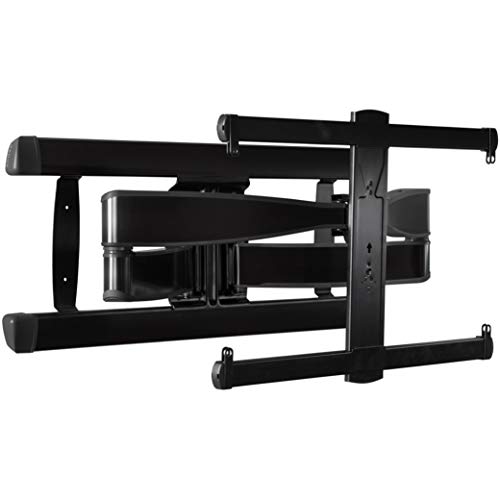
SANUS Full Motion TV Mount

Antimbee Studless Drywall TV Mount for 13-55 inch TVs, 100 lb
Why These Options Stand Out
A television mounted above a fireplace often sits higher than the comfortable eye line of someone on the sofa. The 12-degree tool-free downward tilt on this SANUS model lets you angle the screen toward the room without pulling it away from the wall.
The 5.7-inch extension adds a little room for cable management, which matters when the wall plate and television connections sit close together. It accommodates screens from 46 to 90 inches and supports up to 150 pounds, making it a sensible middle ground between a basic fixed bracket and a full-motion arm.
The Practical Payoff
- Tool-free tilt adjustment helps control glare from windows and overhead lighting.
- A 150-pound capacity covers many large televisions without moving to an oversized articulating design.
- The short extension gives cables more room to bend behind the display.
- Included hardware and a drill template support more organized installation planning.
Points To Note
- This tilt-only design cannot swing to a side seating area like a full-motion mount.
- Confirm the television weight, mounting-hole pattern, and wall structure before installation.
Feature Snapshot
Who It Suits Best
This mount suits households with a large television mounted above a fireplace, an entertainment console, or another elevated viewing area.
Where Another Pick Suits Better
Viewers who regularly watch from different parts of a room may find the FORGING MOUNT Long Arm TV Mount more accommodating.
A 97-inch television leaves less room for error than a compact display, so the Perlegear Full Motion Wall Mount stands out for its broad compatibility range. It supports screens from 42 to 97 inches and televisions weighing as much as 132 pounds.
Unlike the SANUS Tilting TV Wall Mount 46-90 inch, this articulating design can pull away from the wall and change position. That flexibility makes it useful in open living areas where the sofa sits at an angle to the screen, although the greater movement also requires more careful wall selection.
Why It Works Well
- The broad size range accommodates very large displays in rooms with substantial wall space.
- Full-motion positioning lets you redirect the screen toward different seating areas.
- Compatibility with wood studs, solid concrete, and brick broadens the installation options.
Trade Offs
- The larger moving assembly needs a strong, appropriate mounting surface.
- Stud spacing beyond 16 inches requires the manufacturer’s extension bracket.
- Full-motion positioning takes more wall clearance than a tilting mount.
At A Glance
Made For
This bracket fits people with a very large television who need side-to-side positioning or unusually wide display compatibility.
Another Choice May Suit
Those mounting a 65-inch television in a narrow room may prefer the lower-profile SANUS Full Motion TV Mount.
Sometimes a television does not need to travel across the room; it only needs to lean downward a few degrees. The SANUS Tilting TV Mount, 37-80 inch offers a straightforward solution for glare from a nearby window or lamp.
This model supports televisions up to 130 pounds and accommodates mounting patterns from 100 x 100 mm to 600 x 400 mm. It is less elaborate than the Perlegear Full Motion Wall Mount, which can be a practical advantage in a bedroom, den, or compact living room where a long articulating arm has little room to operate.
Where It Excels
- Tool-free 10-degree tilt adjustment reduces glare with little effort.
- The broad screen range covers common bedroom and living room sizes.
- A fixed tilting format keeps the television close to the wall.
Small Caveats
- The 37-inch minimum excludes many compact bedroom displays.
- Tilt adjustment does not reposition the screen toward a separate seating area.
Best Suited To
This mount suits people who want straightforward glare control for a 37 to 80-inch television without a large moving arm.
Consider Something Else When
A 13 to 55-inch television in a rental room may align better with the Antimbee Studless Drywall TV Mount.
Mounting from the ceiling changes the geometry of a room, especially when the television sits above a desk, bed, or small seating area. The PERLESMITH PSCM2 uses a hanging pole and adjustable bracket, leaving the wall largely open for furniture and traffic.
It fits 26 to 65 inch displays, with a VESA pattern range from 100 x 100 mm to 400 x 400 mm and a 110-pound capacity. Unlike the SANUS Tilting TV Wall Mount, 37-80 inch, it does not depend on a usable wall position for the screen itself, though it still requires a securely attached ceiling structure.
What Makes Sense
- Ceiling placement keeps wall space available for furniture and movement.
- Height adjustment helps position the screen for seated viewing.
- The size range covers many bedroom and office displays.
Where It May Fall Short
- Drywall alone is not a suitable mounting surface for this bracket.
- The pole must connect to a wood stud, concrete, or brick structure.
- Ceiling placement requires access above the room during installation.
Key Specs
Who Will Love This
This ceiling bracket suits people with a 26 to 65-inch display who want to preserve wall space in a bedroom, office, or compact living area.
A Better Fit Elsewhere
The Perlegear Full Motion Wall Mount suits people whose television must move between several viewing positions.
Corners and divided living spaces often place the television where no single seat has a straight-on view. The FORGING MOUNT Long Arm TV Mount extends up to 43 inches, giving the screen more freedom to move around a corner or toward a distant seating area.
Its dual-arm construction supports 42 to 80 inch televisions, with continuous swivel and a tilt range from 5 degrees upward to 10 degrees downward. Compared with the SANUS Full Motion TV Mount, the longer reach makes this the more specialized choice for unusually wide positioning needs.
Features That Help
- The 43-inch extension reaches around corners and across open-plan seating areas.
- Continuous swivel supports frequent changes in viewing direction.
- Upward and downward tilt gives you additional control over screen angle.
- The dual-arm design suits larger screens within its stated size range.
Details To Watch
- Long reach requires more clearance around the mount and neighboring furniture.
- Installation demands attention because the extended arms carry more leverage when moved.
Technical Highlights
Built With In Mind
This long arm suits people mounting a 42 to 80-inch television around a corner or across a wide, open seating area.
Look Elsewhere When
A close, wall-hugging installation is easier to manage with the SANUS Tilting TV Wall Mount 46-90 inch, 150 lb, 5.7 inch Extension.
The SANUS Full Motion TV Mount offers a more balanced level of movement than the FORGING MOUNT Long Arm TV Mount. Its arm extends up to 28 inches, allowing the display to leave the wall without projecting as far into the room.
You can swivel the screen and tilt it to suit your seating position, which works well in a kitchen overlooking a living area or a sofa placed beside the display. The model handles 42 to 90 inch televisions up to 125 pounds, giving it a broad fit for large screens.
A Strong Showing
- Extension, swivel, and tilt provide several ways to adjust the viewing angle.
- The 28-inch reach suits open rooms without using the longest arm in this list.
- Large-screen support reaches up to 90 inches.
- FluidMotion movement suits frequent repositioning.
Practical Considerations
- The television and extended arm need enough space to move without striking nearby objects.
- Its 125-pound limit is lower than the 150-pound capacity of the larger SANUS tilting model.
The Right Fit
This mount suits people with a large television who want flexible positioning without the extreme reach of a corner-oriented arm.
Reach For A Different Pick When
Your television exceeds 125 pounds, making the SANUS Tilting TV Wall Mount 46-90 inch, 150 lb, 5.7 inch Extension a closer fit.
Finding a stud can derail a weekend installation, particularly in a rental where drilling into a convenient wall location is restricted. The Antimbee Studless Drywall TV Mount is designed for placement on drywall without locating a wooden stud.
It handles televisions from 13 to 55 inches and up to 100 pounds, making it most relevant for smaller bedroom, kitchen, office, or monitor-sized displays. A built-in bubble level, matching screws, and step-by-step instructions help keep the bracket aligned during setup.
Noteworthy Benefits
- Studless installation removes the need to center the bracket on wall framing.
- The included bubble level helps simplify accurate placement.
- Hardware for different television hole patterns supports a smoother setup.
- The 13-inch lower limit accommodates compact displays and monitors.
Some Limits To Know
- The 55-inch maximum excludes most large living room televisions.
- Drywall construction and condition still matter, so the wall should be checked before mounting.
Quick Facts
Whose Shelf It Belongs On
This bracket suits renters and beginners mounting a smaller television or monitor on drywall without locating a stud.
Where A Sibling Pick Shines
A large television in a wood-framed wall may be better served by the SANUS Tilting TV Mount, 37-80 inch and its broader screen range.
Fit the Mount to Your Room and Screen
Start with the television rather than the bracket. Screen size and weight narrow the choices quickly, while the mounting pattern determines which brackets can physically attach. VESA, short for Video Electronics Standards Association, refers to the standardized hole spacing found on the rear of many displays.
Check Size, Weight, and Hole Spacing
Your television’s manual or rear panel should list its weight and VESA pattern. Match both figures to the mount, and leave some margin between the television’s stated weight and the bracket’s capacity rather than operating directly at the limit.
Decide How the Screen Must Move
A fixed or tilting mount suits one main seating position. Full-motion models help when the screen must face a kitchen, window seat, or second seating area, while a long arm suits corners and wide rooms where you need considerable reach.
Understand the Wall and Ceiling Structure
Studs, concrete, brick, and drywall require different fastening methods. Drywall-only products can simplify one installation, but a ceiling bracket needs a secure structural connection, and larger articulating arms need enough surrounding clearance to move safely.
Common Mistakes and Useful Upgrades
Mistakes Worth Dodging
The most common error is choosing by screen size while overlooking weight or VESA spacing. Measure the wall area, check cable routes, and consider where the screen will sit after tilting or extending, because a bracket that fits technically may still crowd the room.
What Separates Premium From Basic
A costlier mount may add greater reach, wider load limits, smoother movement, or more adjustment points. Those benefits matter when the television serves multiple rooms or seating areas, while a simpler tilting model remains sensible for one dedicated viewing position.
Frequently Asked Questions
Do all flat screen wall mounts fit the same television?
No. You need matching weight limits, screen dimensions, and VESA hole patterns. Check the rear of your television and its documentation before choosing a bracket.
Is a tilting mount easier to install than a full-motion model?
Tilting mounts generally have fewer moving parts and less installation complexity. Full-motion models still install conventionally, but their arms need more clearance and careful alignment.
Can I mount a television above a fireplace?
A tilting mount can angle a screen downward toward the seating area. You still need to account for heat, viewing distance, wall construction, and the manufacturer’s fireplace guidance.
Can a television be mounted directly on drywall?
A studless drywall bracket can work when it uses suitable anchors for the wall conditions and display weight. Larger televisions generally call for a structural connection to a stud, concrete, or brick.
Why does mount reach matter in an open room?
A longer arm lets the screen move toward side seating areas or around a corner. It also needs more physical clearance, so measure nearby furniture and walking paths before installation.
Final Thoughts
The right flat screen wall mount follows the shape of your room rather than simply the size of your television. Tilt handles glare, full motion redirects the screen, a ceiling pole opens up wall space, and a studless bracket simplifies drywall placement. Match the mount to your screen, wall structure, and viewing pattern, then install it with room to move.